We’re giving away a limited edition Modern Warfare 2 Xbox 360 bundle!
We are kicking off our holiday giveaways with a bang! We’ve teamed with our friends at shoot it! to bring you this Modern Warfare 2 Xbox 360 limited edition console, a $400 value. The bundle includes a custom Xbox 360 console with exclusive design, a 250GB Xbox 360 hard drive, Call of Duty Modern Warfare 2, a pair of black controllers, and more. It hits stores on November 10th, and we’ve pre-ordered one that we’re giving away to one of you. Be sure to check out the giveaway rules to see how to enter!
Monday September 28, 2009 3:25 pm
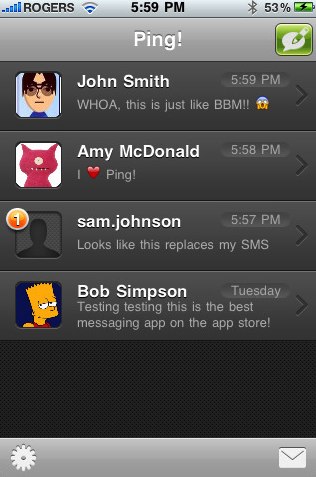
Ping! brings iPhone-to-iPhone messaging to the App Store

We were just alerted to a new iPhone and iPod touch app called Ping!, which aims to provide free iPhone-to-iPhone (and iPod touch) messaging to users of those devices. We tried it, and thought it was worthy enough to give a shout out to.
Basically, once you download the free Ping! application, you set up a username, and you are set. You can invite others from within the app over email, letting them know your username, and also set up whether you want push notifications or not. Once you start a conversation, it’s very similar to SMS…except it’s free, and instant. You get the speed of an IM conversation with the persistence of SMS, all at no extra cost. Even better, it works internationally. So you can send and receive messages with people in other countries, and again, at no extra cost.
Go ahead and give Ping! a try, we think you’ll like it.
Read More
| Ping! in App Store
- Related Tags:
- bbm, blackberry messaging, free messaging, free sms, iphone, iphone apps, iphone to iphone messaging, ipod touch, ipod touch apps, messaging, ping, sms
Advertisement
Advertisement
Advertisement
© Gear Live Media, LLC. 2007 – User-posted content, unless source is quoted, is licensed under a Creative Commons Public Domain License. Gear Live graphics, logos, designs, page headers, button icons, videos, articles, blogs, forums, scripts and other service names are the trademarks of Gear Live Inc.


Digg This


Comments:
i and 2 of my friends downloaded this app but strangely 3 of us were stuck at “Connecting. Please wait.” We tried uninstalling and installing the app and even tried rebooting our phones but it didnt work.. any ideas.? thanks.. !
Reply to this: comment | thread
hey iPhone ADDiCT, one of the reason is maybe ur iphone is jailbroken and u dont have a proper push activated on ur iphone, it happens on my friend too
so far Ping! delivered all the message almost instantly
Reply to this: comment | thread
Does Ping run as a background application, much like a BB messenger?
Reply to this: comment | thread
If you turn on push notificatiolns, yeah
Reply to this: comment | thread
Quote “hey iPhone ADDiCT, one of the reason is maybe ur iphone is jailbroken and u dont have a proper push activated on ur iphone, it happens on my friend too”
I have the same problem, stuck at “Connecting”, JB running 3.0.1
Any solution to this??
Reply to this: comment | thread
hey, I use Ping! and it works great for me. But how can i add an avatar? And how can you add icons in a conversation?
Reply to this: comment | thread
MY PROBLEM IS THAT IT KEEPS SHUTTING ITSELF OUT…
ILL GET A MESSAGE AND WHEN I GO CLICK ON THE NAME OF THE PERSON WHO SENT IT, IT WILL SHUT ITSELF OFF AND GO BACK TO THE MAIN SCREEN.
ALSO WHEN I TRY TO SEND A MESSAGE TO SOMEONE, IT WILL GO FINE UNTIL I PRESS SEND, THEN SHUTS OFF AND GOES BACK TO THE MAIN SCREEN,
ANY SUGGESTIONS? OH, I DID UNINSTALL IT A COUPLE OF TIMES AND REINSTALLED IT. I ALSO REBOOTED, BUT NO LUCK
THANKS
ERICK
Reply to this: comment | thread
CAPS LOCK IS AWESOME.
(I also got connecting please wait. 2G, jailbroken.)
Reply to this: comment | thread
Just downloaded the app and it’s working great. The messages arrive almost instantly. Very happy with this development, hope that in the near future it’ll be capable of send short voice notes.
Reply to this: comment | thread
I have just upgraded to a new iPhone from a old 8Gb and would like to know how to add my old ‘Ping ID’
Everytime i put it in, it says, ‘ID taken’ !
Help please as I like my old ID !!
Reply to this: comment | thread
CONNECTION PROBLEM SOLVED
If you’re having problem with the “please wait, connecting” you need to TURN ON the notification from the iphone settings. and make sure you have PING! notification ON for all three (sound, badges etc)
************************* SOLVED*******************************
Reply to this: comment | thread
I did those steps but the problem persists with the connection :(
Reply to this: comment | thread
same like me..always connecting please wait..os still 3.0..and notification on phone setting is ON but doesn’t work..please help..
Reply to this: comment | thread
i had the connecting problem aswell, gave the phone a shake to refresh & now its working ! hope it works for you guys..
neveo
Reply to this: comment | thread
needs friend request and buddy list like bbm… Dont like how anyone who finds out my user name can ping me..
also would be better if u can send photos and voice notes like bbm
Reply to this: comment | thread
The same thing happens to me, ¿Did you fix it? ¿How?
Reply to this: comment | thread
Hi guys! I know the solution to the “Connecting, Please Wait” problem when starting the Ping! application. The solution is on my blog, click on my name to view my blog
Reply to this: comment | thread
I know the solution to the “Connecting, Please Wait” problem when starting the Ping! application. The solution is on my blog, click on my name to view my blog
Reply to this: comment | thread
I know the solution to the “Connecting, Please Wait” problem when starting the Ping! application. The solution is on my blog, click on my name to view my blog
Reply to this: comment | thread
I have the same problem as well..
i have tried following those steps above (turn on all teh notifications and install-unistall), i even shake my iphone like suggested by neveo, but none of those works..
can someone please help..
Thanks
Reply to this: comment | thread
I am also having the same problem. I must have re-installed it like 10 times now. rebooted, force restart and all that ####. Can someone please help? can’t contact the creator for tech support.
HELP!
Reply to this: comment | thread
hey TechBoy London, I’d really like to know how to solve this problem, though I can’t click on you name.. I dunno if you’re allowed to post URL’s here.. if yes, please post the URL to your blog, if no, please PM me
THX
Reply to this: comment | thread
btw, I got a JB 2G OS 3.1, using iTunes 9 on Windows 7 RC…
I’ve tried it all, still the “Connecting, Please Wait” message appears
Reply to this: comment | thread
It shuts itself down when trying to access different contacts’ strings. How can I solve it? I have rebooted and reinstalled and the only difference is that the contact that causes the conflict is a different one
Reply to this: comment | thread
same thing happens to me it keeps shutting off! Its a great app since im in Nicaragua and all my friends live in the US id love to use this app but it keeps shuting down on me! Help!
Reply to this: comment | thread
@TechBoy Lodon: nevermind, I found your blog through google
for all the others:
blogs dot warwick dot ac dot uk/atejumola/entry/how_to_make/
Reply to this: comment | thread
DONT WORRY HELP IS ON HAND what u have to do is uninstall the ping app then add this source in cydia/icy cydia.iphoneil.net then install push fix then install ping reboot phone
bravo u r now pinging
IF THIS HELPED PLEASE THANK
Reply to this: comment | thread
installing push fix helped half way. i can send but cannot receive.
Reply to this: comment | thread
@iphone god
I tried the follow steps but Ping! says (Connecting please wait):
1. uninstall ping!
2. add source cydia.iphoneil.net to cydia
3. search for “push” in cydia and install “Push Fix” . Did and did not reboot the device.
4. install ping! again.
5. reboot device (iphone v 3.0).
EXTRA:
6. settings like wireless password / e-mail passowrd will be erased.
Reply to this: comment | thread
sorry the solution works!!
It’s connected after a while:
1. uninstall ping!
2. add source cydia.iphoneil.net to cydia
3. search for “push” in cydia and install “Push Fix” . Did and did not reboot the device.
4. install ping! again.
5. reboot device (iphone v 3.0).
EXTRA:
6. settings like wireless password / e-mail passowrd will be erased.
Reply to this: comment | thread
dp - how did you get it to work?
I’ve tried iphone god’s steps as you’ve listed and I still get the Connecting. Please wait. Screen.
If you tried the steps again did you uninstall Push Fix and Reinstall it? I’ve tried this a few times:
1. Uninstall Ping!
2. Uninstall Push Fix.
3. Reboot
4. Install Push Fix. (No Reboot)
5. Install Ping!
6. Reboot.
I have iphone 3.0 as well.
Reply to this: comment | thread
shout out to Q-Dogg! fix worked
thanks man
Reply to this: comment | thread
After the push fix, I can send but I can’t receive anything.
Any ideas?
iPhone 2G with 3.0 firmware.
Reply to this: comment | thread
dp
I followed your instructions yet nothing happened. still having “connecting please wait”
what am I missing?
Reply to this: comment | thread
I am having the same problems in australia this is annoying as my paartner is overseas and hers is working arghhhh
Reply to this: comment | thread
it worked well on the first day installed which was yesterday!
But today i could not receive any ping from my friends, but they can get mine!!!
Wats goin on?
Can anyone pls tell me?
Reply to this: comment | thread
@iphone god : thank you for the steps, it works (at least no more connecting please wait appeared)
but there seems to be another problem, and i was hoping you or anyone here could help.
i couldn’t send messages, even when it says that my server status are owkay.
but one from 3 of my friend who tried to ping me could send me message (but only one time deal only, and after that it’s not working anymore)
Reply to this: comment | thread
iphone god your steps were flawless! Thank you!
Reply to this: comment | thread
The app asks to choose a Ping! ID only but doesn’t require a password nor an email, so how does that work when you restore your iPhone or get a new one? The app won’t accept the ID you already taken on your old phone?
I don’t get this part? How can my ID be mine for future iphones or old ones?
Reply to this: comment | thread
Awesome! I can downgrade my plan now
Thanks a lot!!!
Reply to this: comment | thread
woww!
iphone god.. your phone fixed my unlocked 2g iphone! yayy
thankss!!
Reply to this: comment | thread
Fix the Connecting issue in detail-
http://tysiphonehelp.com/forum/showthread.php?t=2694
Reply to this: comment | thread
I was having the same issue. Initially on the install I said “don’t allow” to notifications and the ‘Connecting. Please wait message’ was continuous. If you delete the App and reinstall you will not be asked the question again, so don’t bother uninstalling.
I went to the iPhone Settings -> Notifications -> Ping! and set all the notifications to “On” (Sounds, Alerts and Badges). When I went back to Ping! it connected instantly. Now I just need to find some other iPhone contacts to fully test the application with.
Oddly if you now turn the settings to Off, Ping still connects.
Reply to this: comment | thread
i have a unlocked and jailbroken 3.0 iphone 2G.
after doing the manual fix, i was able to connect to ping and send. but i cannot receive..
i also tried the push fix from cydia… same results..
reinstalled app multiple times and rebooted..
seems that a lot of people have this problem, is there a solution??
Reply to this: comment | thread
PUSHFIX DOES NOT WORK. The reason for ping! not working on your iphone is because it is H(activated). If you activated your iphone with DevTeams stuff and not itunes push will not work. Unlocked Iphones can’t use push notification. Push fix in Cydia does not work. It assigns EVERYONE the same unique key/ID so you end up getting messages from random people who also installed pushfix. Google it.
Reply to this: comment | thread
if it doesnt work with u do as follows
no need for jailbreak or cydia
1. Delete the App from your iphone .
2. go to : Settings >> General >> International >> Region Format >> United States .
3. again go to “Settings” and activate your push notification .
4. now connect the iphone to your computer’s itunes and re-install the App .
5. re-start your iphone , now it should work correctlly .
Warning ! : the app is not for free anymore now its 0.99$ !
P.S i think the avater thing + icons is a trick
to have pic avaters u need to add them in contacts file if that “ping"er is in ur no# list
and icons .. well thats a 3rd party app like “icon board” its free , u copy the icons from it
then paste them in the conversation .
Reply to this: comment | thread
I don’t know why you guys don’t read the f***ing posts carefully
TechBoy London had the solution a long time ago…. It’s on his blog, I have tried it on 2 iPhones myself, it works perfectly!! It’s a little more complicated than installing sth from cydia, but at least it works.
I posted the URL before, but here it is again:
blogs dot warwick dot ac dot uk/atejumola/entry/how_to_make/
Anyone still complaining about pushfix not working for them is a retard!
Reply to this: comment | thread
Hi! I’m very happy with the ping but i have a time difference in sending ping messages!
my boyfriend has got the same problem. how can i solve this?
Reply to this: comment | thread
This URL is about PUSH NOTIFICATIONS FIX, that was out months ago….
If you read comments here and on the link you posted….. more than half of the people can send, but cannot receive… as in my case with t-mo in US.
This is the problem right now with Ping, if anyone has a real solution to this, please share.
Reply to this: comment | thread
There’s no link to click, what’s the address for your blog? Trying to fix this issue..
Reply to this: comment | thread
Comments: Page 1 of 2 pages 1 2 >